
A new Authorization Type option – Managed credential – is added in REST request configuration. This allows one credential to be configured centrally and then to be reused by selecting it from a list in different data sources and different REST request definitions. Now, when you configure a REST request, you select the Authorization Type first. The old authorization types – Basic Auth, OAuth 2.0 and OAuth Bearer Token – are marked as deprecated in brackets.
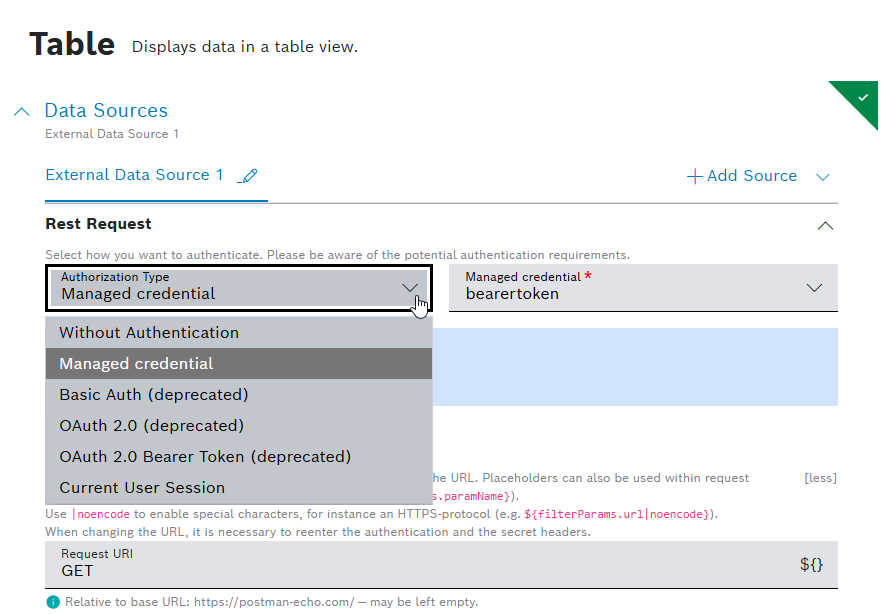
The new Managed credential option can be selected in External Data Source and REST Request Button Options, Table Action Button(HTTP Method) and Batch Action buttons configurations, as well as in configuring personal notifications. Upon selection, a drop-down list of all Managed credentials of type http which have been predefined centrally, is shown to be used in the neighboring field. When you select a credential object, an info dialog appears with its details – Base URL and Auth type – in a read only mode. A hint shows the configured Base URL and additional information that a relative path/URL can be used:
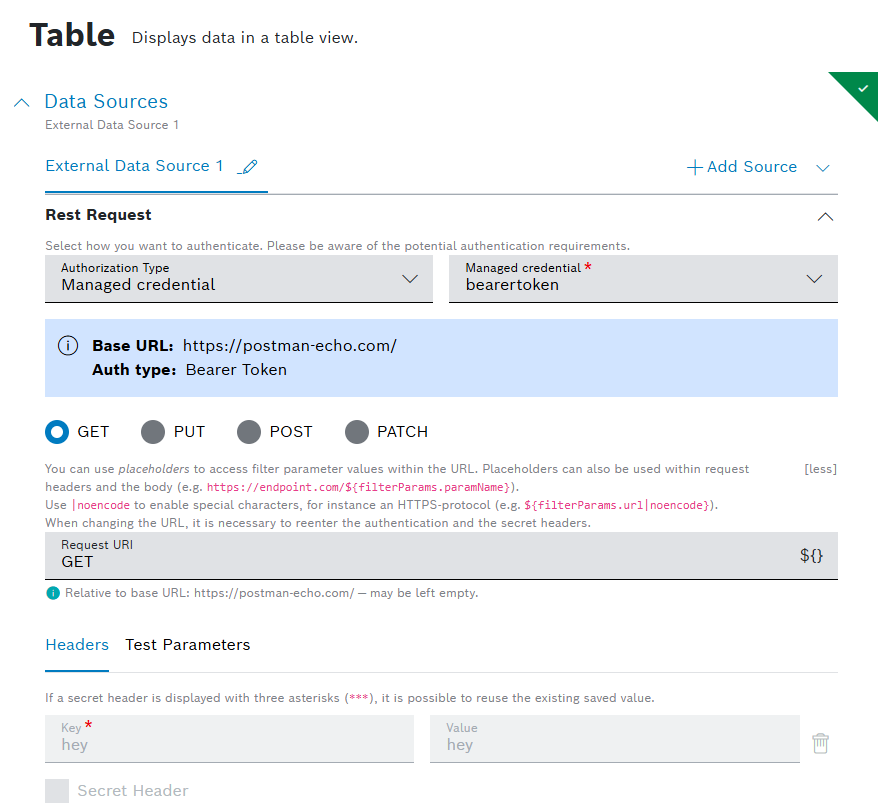
Below the hint, the headers will be displayed in a read only mode automatically if defined in advance while configuring the credential.
To learn more about Credentials, refer to Credentials user guide.